
october 08, 2026
Automatic table and field descriptions: how to move away from manual database documentation
What is the most frequent problem with any database, data warehouse, or BI? That is right — there is no documentation at all. And what is the main pain point for any developer or analyst? That is right — writing documentation. The biggest issue is that documentation is always written manually, which means that large volumes can only be handled with substantial labour costs. Very often, documentation is simply ignored, without taking into account that many times more time will ultimately be spent searching for and understanding the data.
How to tackle this? After all, we live in the AI era.
General concept of automatic metadata description using AI
So, we decided to harness AI and assign it the most routine part of the work.
However, it is important to stop here and ask the right question: what exactly should the artificial intelligence do to produce a meaningful description rather than a formal set of words?
The simplest option is to take the table DDL, pass it to the model, and ask: «Describe what is stored here». This approach seems obvious, but in practice, it almost always yields poor results. The reason is simple: table and column names rarely reflect the actual business content of the data. This is especially true for legacy data warehouses that have evolved over years.
Let’s consider a column called CLIENT_NAME. It seems obvious that it contains the client’s name. But when we look at the data, we see: «Smith John Robert». This is no longer just a name, but a full name. Or take the currency_code column, which contains values such as GBP, USD and EUR. Without analysing the data, it’s possible to guess that this is a currency code, but such examples are by no means always so obvious. And sometimes there are fields such as «n24id», where neither a human nor an AI can make sense of it without additional context.
So, what do we look at when creating a business description? Firstly, there are the metadata themselves: table and column names, data types, keys, constraints, and relationships with other tables. Secondly, there is the column content — sample values, the nature of the data, frequency, and formats. This is often where the core business meaning lies. Thirdly, context is crucial: how the table connects to other objects, whether it participates in data marts, and whether it is used in reporting.
In essence, AI replicates the exact path an analyst takes when opening an unfamiliar table for the first time. It looks at the name, then at the fields, then inspects the data, and based on all these signals forms a conclusion: what this table is and what it is for. We are simply automating this process and scaling it to hundreds and thousands of objects.
At the same time, it is important to understand the limits of these capabilities. If a human looking at a table cannot understand what is stored inside, artificial intelligence will not manage either. There is no magic here. The good news, however, is that such situations are not that common in practice. In most corporate data warehouses, tables and fields do carry a clear business purpose — it is just that it has never been documented anywhere.
Solution architecture
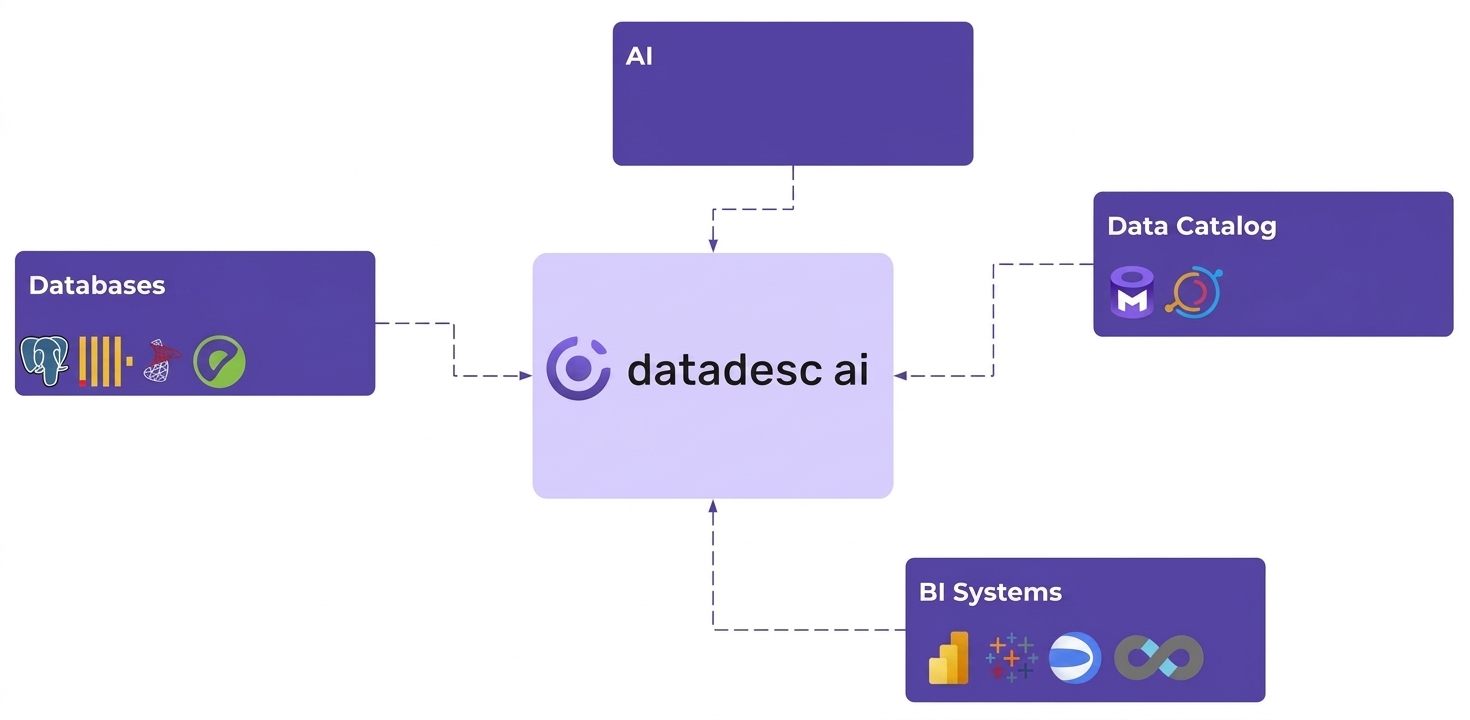
At the core of the architecture lies a simple and intuitive pipeline.
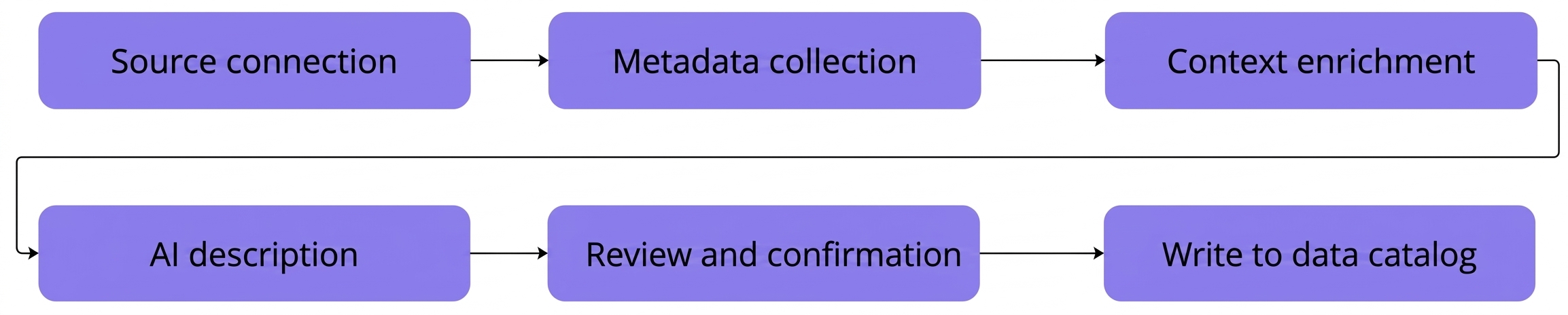
First, the system connects to data sources and reads metadata: schemas, tables, columns, procedures, and relationships. Various DBMSs are supported: from classic PostgreSQL and MSSQL to analytical data warehouses. This stage is fully automated and requires no user intervention.
Next, the metadata is enriched with additional context. Data types, keys, constraints, and, if necessary, sample values are collected for tables and columns. All of this is brought into a unified internal format that is convenient to pass to the AI module.
The next step is generating business descriptions. The prepared context is passed to the LLM alongside a prompt that strictly defines the model’s role, output format, and requirements for the result. The generated descriptions are saved separately from technical metadata and tagged as requiring confirmation.
It is worth noting separately that the solution was originally designed as on-premise. This is critical for enterprise: data does not leave the company perimeter, proprietary models or locally deployed LLMs can be used, and the architecture easily scales for large data warehouses and BI landscapes.
LLM usage and prompts
For the metadata description task, we use LLMs as a text generation tool rather than a universal source of knowledge. The model should not «guess» what a specific table or field is. Its task is to generate a clear, neat, and reproducible description based on the provided context.
In practice, two types of models are used:
1. LLMs for generating descriptions of tables, columns, procedures, and other objects.
2. Embedding models used for semantic search, grouping metrics, and maintaining context. This is crucial because the documentation itself becomes a valuable knowledge base for future use.
The prompt is the key element of the entire system. The quality of the response directly depends on it — garbage in, garbage out.
- First, the model’s role is set. For example: you are an analyst or technical writer documenting a corporate data warehouse. This significantly influences the tone and content of the output.
- Second, the task is clearly defined: what exactly needs to be described — the entire table, each column, business purpose, or technical logic.
- Third, the output format is specified. Without this, the model begins to improvise, changing the structure of the text from query to query.
- Finally, an example of a correct response is provided. For an LLM, this works much like it does for a human: one good example substantially improves output quality.
Experiments with Chain of Thought (CoT) deserve special mention. We tried forcing the model to reason and explain how it arrived at a particular conclusion. However, in the context of documentation tasks, this did not yield a noticeable quality boost. Moreover, such reasoning often inflated text volume and introduced redundant details that only cluttered the documentation. Consequently, we retained only the final, structured response.
Even with a well-crafted prompt, 100% accuracy on the first attempt cannot be expected. AI, like a human, can make mistakes, especially in edge cases. Therefore, we initially built in an iterative refinement process. The generated description receives a «needs approval» status, allowing the user to either confirm it or make edits.
These edits are not lost. Approved descriptions serve as additional context for subsequent runs. If a company routinely refers to a CUSTOMER as a «counterparty» rather than a «client» the model starts adopting that exact terminology. In essence, this gradually builds a business glossary for the AI to rely on.
Which LLMs to use?
We have tested many models and arrived at the following list of the best open-source models. The system does not use a single universal model, but rather a set of specialised ones:
- Qwen-coder (14B) is used for analysing SQL and describing ETL logic — it performs well with code and stored procedures.
- Mistral is used for generating and refining business descriptions for tables and fields, as well as for describing BI dashboards based on their content.
- gpt-oss (20B) handles orchestration, acting as an agent that invokes the appropriate model depending on the task type.
- qwen3-embedding (4B) is applied for semantic search: descriptions are converted into embeddings and saved in PostgreSQL with pgvector, allowing for fast conceptual data retrieval.
BI dashboard business description technique
Describing BI dashboards is one of the most challenging tasks in automated documentation. Unlike tables, here it is essential to understand not only the structure, but also the intent of the visualisations and how the business should interpret the data.
The process begins by collecting the BI report’s metadata: the list of dashboards, tabs, charts, visualisation types, and metrics used. In addition, images of tabs and individual charts are generated so that the AI can analyse the visual context rather than relying solely on element names.
When generating descriptions, the model does not rely on specific values shown on the charts. Numbers, percentages, and current indicators change rapidly and should not be included in the documentation. Instead, the AI focuses on the purpose of the visualisation: what data is shown, which business metrics are used, and what management decisions the chart is intended to support.
For each chart, a concise description and analytical guidelines are generated — highlighting what to look for and what insights can be drawn. Based on all individual charts, a summary description of the tab is then created, followed by an overall description of the entire dashboard.
Prompts play a critical role here: they strictly constrain the model, prohibiting the interpretation of specific values while requiring it to simultaneously factor in the chart type, its title, and the set of metrics. This approach yields stable, business-ready descriptions of BI reports.
Keeping documentation up to date
Data warehouse structures are constantly evolving. New tables and fields appear, stored procedures are refined, and BI dashboards along with their underlying logic are updated. If documentation is not kept up to date automatically, it rapidly loses value and ceases to reflect the actual state of data.
The updating process begins with regular metadata refreshes. The system reads the current structure of data sources and compares it with the previously documented state. This identifies new tables, columns, procedures, and BI objects, as well as changes to existing elements. The documentation generation process is then triggered automatically for all new or undocumented objects.
At the same time, re-describing occurs deliberately. If an object’s description has already been approved by a user, it is not overwritten. Only new objects or those in the «needs approval» status are re-processed. This approach preserves manual edits and accumulated business context.
For SQL procedures, changes are tracked via text diffs, whereas BI dashboards present a more complex challenge. A dashboard may remain visually unchanged while its underlying set of metrics or calculation logic shifts. Consequently, the updating of BI descriptions relies on refreshing BI system metadata and re-describing only those dashboards, tabs, and charts that have not yet been confirmed.
Integration with data catalogs
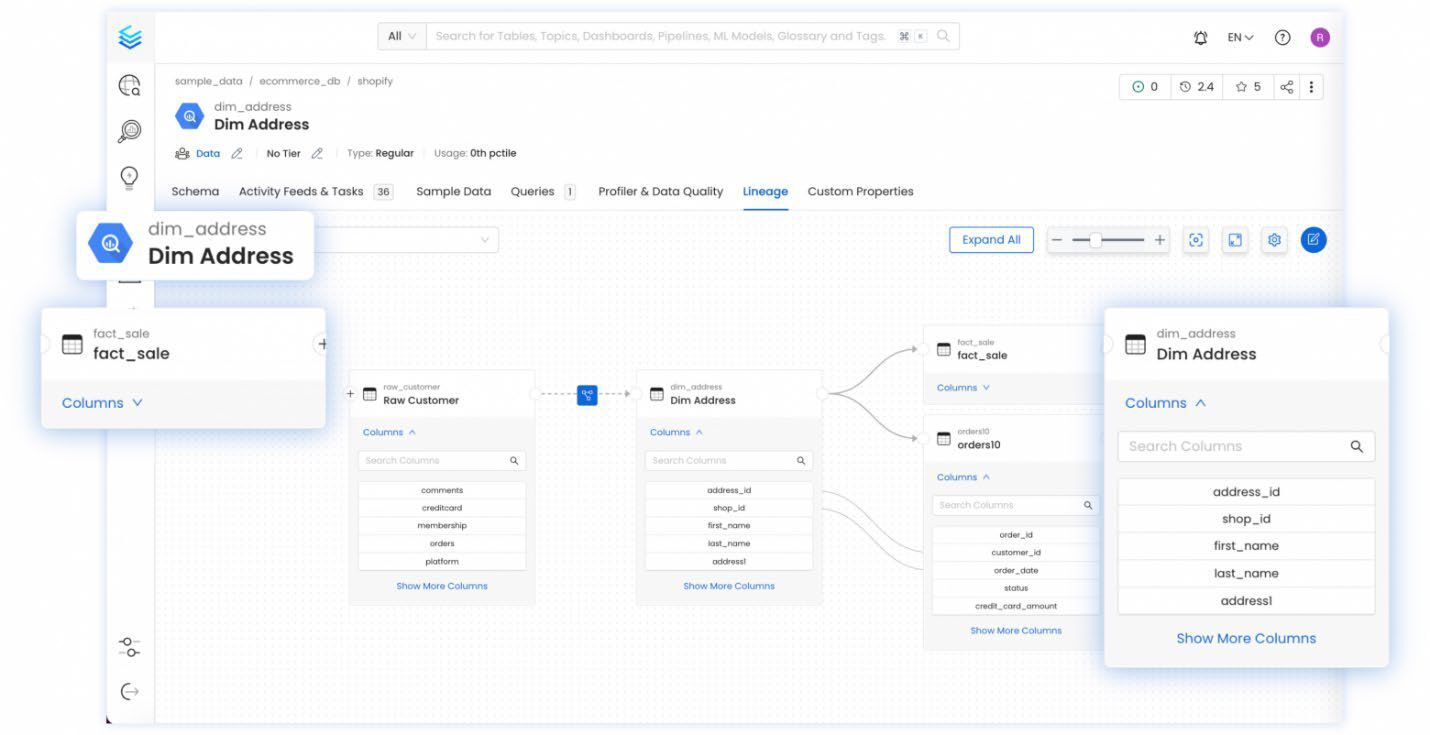
Automated metadata description does not replace a data catalog, but rather complements it. The data catalog remains the central entry point for working with data and data governance processes, while the AI solution takes on the task of generating and updating business descriptions. Integration is implemented via APIs and SDKs: generated and approved descriptions are automatically pushed to the data catalog, becoming part of the overall metadata model and accessible to all users.
Business impact
Automated description dramatically reduces the time and effort required for documentation and data analysis. Teams can navigate legacy data warehouses much faster, analyst onboarding is accelerated, and the data catalog is populated with up-to-date business descriptions. In practice, up to 90-95% of descriptions are accurate from the very first iteration, keeping remaining manual effort to a minimum.
Conclusion
Manual documentation does not scale, whereas automated documentation is becoming an integral part of data management. The combination of AI and a data catalog allows organisations to maintain up-to-date knowledge about their data without unnecessary routine or loss of expertise.
Submit a request on our website, and we will demonstrate how our solution works!
